Personal targets, shared practice
Use recorded bests to set appropriate pace targets within a group workout.
 PaceCommand
COACHING SOFTWARE FOR RUNNING TEAMS
Plan the session. Capture the splits. Give athletes their workouts, feedback, and progress in the same connected training app.
14 days free · No credit card required
Get PaceCommand on your phone

 PaceCommand/ Sample team
The same workout appears in each athlete’s account.
Monday · 4:00 PM · Assigned to the short sprint group
Your workout plan, live times, and athlete history stay connected.
INSIDE PACE COMMAND
Your training week and team results, in the actual coaching workspace.
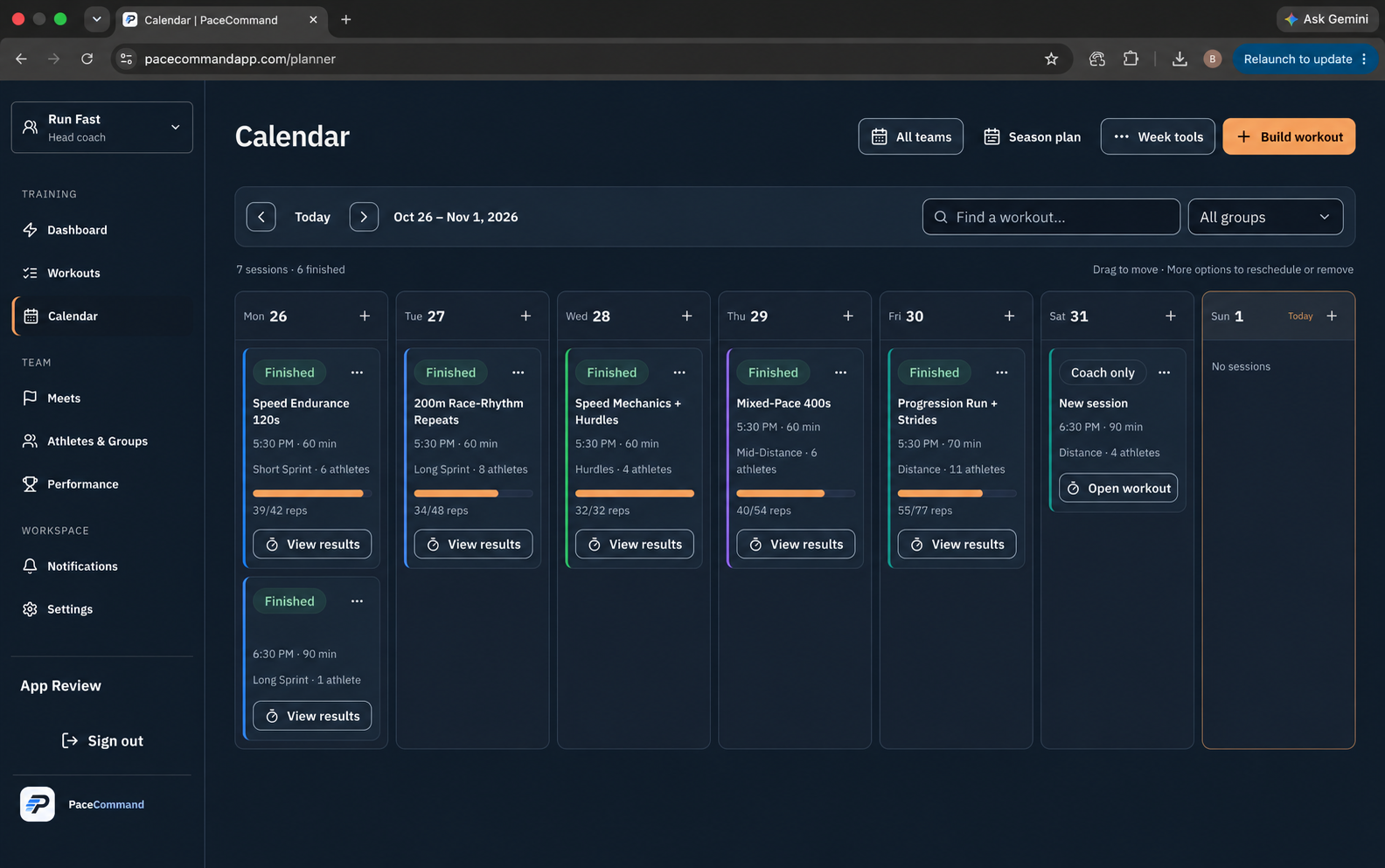
See assigned sessions and recorded work across your training groups, then open a workout to get into the details.
Individual targets, clear team organization, and results you can actually use after practice.
Use recorded bests to set appropriate pace targets within a group workout.
Capture reps and splits, fix a recording mistake, and keep the result with the workout.
Organize men's and women's rosters, training groups, and assistant-coach access, and post team announcements athletes see in the app.
Review practice results, competition marks, and athlete feedback without rebuilding the session, so you can show an athlete or a parent exactly how training is going.
Athlete logins are included with every team plan. Training stays connected before, during, and after practice.
Athletes open their assigned workouts, see targets and recovery, and set a session goal their coach can see.
For coaches: less repeating the plan.Reps, recorded times, and workout conversations stay with the session. Athletes can ask a question where it has context.
For coaches: keep the details together.Athletes review training and competition PRs and complete the post-workout survey their coach assigns, including wellness questions when enabled.
For coaches: results with useful feedback.1. Create your team. 2. Add athletes and invite them to activate their accounts. 3. Assign and send the first workout.
Authorized parents and guardians can be invited to separate, view-only accounts.
Explore Track Command for field-event practice, meets, results and staff working across event groups. Pace Command stays focused on running practice and athlete training.
Every plan includes the same coaching tools. Team size determines the price.
For private coaches, specialty groups, and small squads
About $1.27 per athlete a month
For a full cross-country squad or growing school team
About $0.78 per athlete a month
For multi-group high school, college, and club programs
About $0.69 per athlete a month
For large programs needing unlimited athletes and coaches
On the Team plan, a full 50-athlete roster works out to about $0.78 per athlete a month, with up to 5 coaches included at no extra cost.
| What's included | Small Team | Team | Program | Large Program |
|---|---|---|---|---|
| Athlete seats | 15 | 50 | 100 | Unlimited |
| Coach seats | 2 | 5 | 10 | Unlimited |
| Athlete logins | Included for every athlete | Included for every athlete | Included for every athlete | Included for every athlete |
| Parent/guardian accounts | Up to 2 per athlete, view-only | Up to 2 per athlete, view-only | Up to 2 per athlete, view-only | Up to 2 per athlete, view-only |
| Assistant coach permissions | Groups, roster scope, and permissions | Groups, roster scope, and permissions | Groups, roster scope, and permissions | Groups, roster scope, and permissions |
| Workouts, timing, and results | All coaching tools | All coaching tools | All coaching tools | All coaching tools |
| History | Kept while your team is active · CSV export | Kept while your team is active · CSV export | Kept while your team is active · CSV export | Kept while your team is active · CSV export |
Free guides and worksheets for running groups, practice capture, and athlete records.
Browse coaching guidesSomething else on your mind? Get in touch
Running groups: cross-country and distance teams, sprint squads, clubs and private coaches. It brings the stopwatch, individual pace targets and weekly mileage into one training workspace.
Free team apps like Spond, Heja, and sportsYou handle schedules, chat, and parent messages well. PaceCommand handles the training itself: a pace target for each athlete from their own PR, practice times and splits you can correct, and a season of workout history in one place. Plenty of teams use a free app for messaging and PaceCommand for training.
It isn't meet-management or fully automatic timing software, a team chat or fundraising app, or a training-plan marketplace. If you mainly coach individual runners remotely and rely on GPS-watch sync, a tool like Final Surge or TrainingPeaks is likely a better fit.
PaceCommand is built and run by BP Labs LLC, a small independent software company. Your team's data stays yours: a head coach can export rosters, workouts, and results as CSV files from Settings at any time, and you can delete your account whenever you choose. Support requests go straight to the people who build it.
The trial lasts 14 days and doesn't need a credit card. There is no automatic charge when it ends; the head coach chooses whether to subscribe.
Athletes can have individual logins for workouts, training feedback, and performance history. A head coach can invite up to two authorized parents or guardians per athlete to separate, view-only accounts. A parent must accept each invitation before seeing that athlete's data, and one login can be linked to siblings.
Yes. Coaches and athletes can link one login to multiple teams and view calendars and workouts together or filter by team. Coaches can also reuse their personal workout presets. Each team keeps its own roster, permissions, and subscription. Linking an account does not automatically share an athlete’s history with other teams; athletes control optional cross-team training sharing. Parents can use a family calendar for accepted child links, with team and athlete filters.
No. PaceCommand handles planning, practice timing, and training history. Keep using your official meet-registration and fully automatic timing systems where needed.